
In plain language. BACB fieldwork is the supervised clinical experience every BCBA and BCaBA candidate has to log before sitting for the exam. Post 05 explained the pathway, the activity categories, the supervisor requirements, and the 2027 rule changes from the trainee's perspective. This post is the operational companion — what a practice's software actually has to do, every day and every month, to track those hours correctly, sign the monthly verification form, fill in the right numbers under both rule sets, and keep the record after the trainee moves on. If you are a practice owner setting up fieldwork tracking, or a supervisor trying to understand the workflow your software is running, this is the post for you.
If your practice hires BCBA or BCaBA candidates, fieldwork tracking quietly becomes one of the most compliance-heavy pieces of software you will operate. The trainee's whole credential depends on the numbers being right. The BACB rejects forms with missing BACB IDs, mismatched rule sets, or unsigned months. A supervisor who countersigns the wrong month can invalidate weeks of effort. A trainee who leaves the practice and loses access to their record is effectively starting over.
A solid fieldwork tracker treats the record as the trainee's property — the hours belong to them, the signatures belong to them, the verification forms belong to them — and treats the practice's role as the system that drafts, organizes, and proves the numbers. Cognix Health's Fieldwork module was built for that job. This post walks through what the workflow has to cover, end to end, and what Cognix Health does at every step.
Complementary reading: ABA Goal Phases and Mastery Criteria explains the supervised-data side of the same trainees' day — what the BCBA is recording during the session that becomes the next month's fieldwork draft. The Complete Guide to ABA Therapy Data Collection covers the seven target types a behavior plan can use.
The Fieldwork Surface at a Glance
These are counts of supported values in Cognix Health's Fieldwork module, not claims about the BACB's published requirements. The BACB's own Fieldwork Requirements are the source of truth for thresholds; software supports what the BACB defines.
Who Uses the Fieldwork Module
Three audiences share the same workflow, each with their own surface inside the software. The trainee — the BCBA or BCaBA candidate accruing the hours — opens Fieldwork from their profile, confirms the entries that match what actually happened, adds anything the drafts missed, and signs each month. The supervisor — the BCBA responsible for a portion of the trainee's hours — works inside Cognix Health when they are on staff, or signs through a single-use emailed link when they are an outside BCBA. The practice manager opens the Fieldwork dashboard to see every trainee the practice has on staff, their progress against the totals, and the status of every month in their record. The three surfaces share one record: when a session becomes a draft, when a draft becomes a confirmed entry, when a confirmed entry rolls into a monthly total, when a month is signed and countersigned, every audience sees the same number, the same status, and the same signed page.
The Two BACB Rule Sets: 2022 and 2027
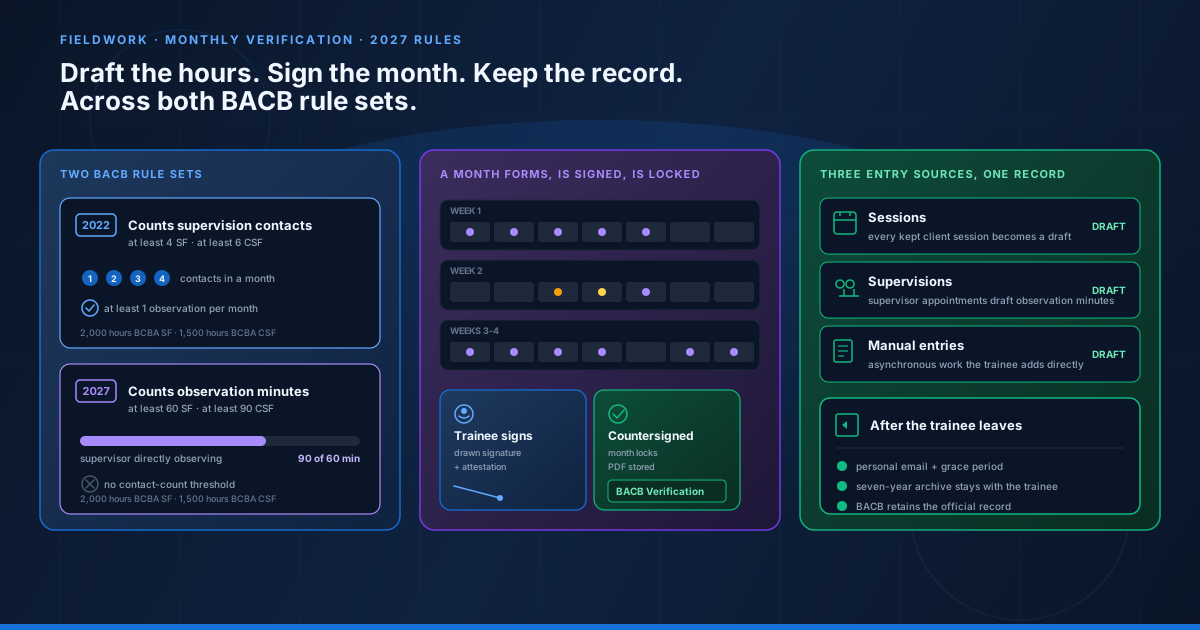
The BACB published two parallel sets of fieldwork requirements during the transition window, and a candidate can apply under either one. Both are always available inside Cognix Health's setup so a trainee can see, in advance, which rule set they are tracking toward. Choosing a rule set affects four things: the total hours required, the monthly hour floor and ceiling, the way supervision contacts are counted, and the supervision percentage threshold.
The 2022 requirements count supervision contacts — discrete meetings where the supervisor was present or directly engaged with the trainee. Observation in the 2022 frame is a count: at least one observation per month, with the supervisor present for at least a portion of a session.
The 2027 requirements count observation minutes instead. The BACB moved from "did you have an observation this month" to "did the supervisor directly observe your work for a defined number of minutes." The contact count itself is no longer a tracked threshold; observation minutes carry that load.
The numbers in the table below are how Cognix Health encodes both rule sets. They reflect the published BACB thresholds as the BACB has them on file. Any time the BACB updates a threshold, the software updates with it — thresholds are data, not code, and they update in one place.
| Pathway | Total hours | Min / max per month | Supervision % | Contact rule | Observation rule |
|---|---|---|---|---|---|
| BCBA · Supervised Fieldwork · 2022 | 2,000 | 20 / 130 | 5% | At least 4 per month | At least 1 count |
| BCBA · Concentrated SF · 2022 | 1,500 | 20 / 130 | 10% | At least 6 per month | At least 1 count |
| BCBA · Supervised Fieldwork · 2027 | 2,000 | 20 / 160 | 5% | Not a threshold | At least 60 minutes |
| BCBA · Concentrated SF · 2027 | 1,500 | 20 / 160 | 7.5% | Not a threshold | At least 90 minutes |
| BCaBA · Supervised Fieldwork · 2022 | 1,300 | 20 / 130 | 5% | At least 4 per month | At least 1 count |
| BCaBA · Concentrated SF · 2022 | 1,000 | 20 / 130 | 10% | At least 6 per month | At least 1 count |
| BCaBA · Supervised Fieldwork · 2027 | 1,300 | 20 / 160 | 5% | Not a threshold | At least 60 minutes |
| BCaBA · Concentrated SF · 2027 | 800 | 20 / 160 | 10% | Not a threshold | At least 90 minutes |
Two practical implications of supporting both rule sets side by side. First, a trainee's monthly compliance check runs under whichever rule set they picked at setup, and the same confirmed entries produce a "met" or "not met" verdict under that rule set's threshold. Second, the CSF multiplier — Concentrated SF hours convert toward the SF total at a fixed ratio (1.3333 for BCBA, 1.3 or 1.625 for BCaBA depending on the rule set) — is automatically applied when a CSF trainee's hours are rolled up toward the SF total. The trainee does not have to do the math; the system does it.
How Entries Get Drafted
A fieldwork entry is the smallest unit of the record. It is one continuous period of work — a session, a supervision meeting, or a manual block — with the date, the start and end time, the kind of work, the category, the supervisor if any, the format, and the observation minutes if any. Every entry has a source, and every entry starts as a draft before the trainee confirms it.
There are three sources:
Sessions — every kept client session the trainee conducts becomes a draft. The draft inherits the session's date, start, end, the client's service code, and the place of service. The kind (independent or supervised) is decided by whether a supervisor's supervision appointment overlapped the session in the system. The category (restricted or unrestricted) comes from the organization's default for the service code, since restricted hours are treatment delivery and unrestricted hours are assessment, planning, or non-billable activities. If the supervisor's appointment listed the same client, the matching observation minutes roll into the entry.
Supervisions — every supervision appointment the trainee is listed on becomes a draft. The draft inherits the date, the start and end, and the supervisor. The kind is supervised by definition. If the supervisor's appointment also had the same client present, the observation minutes roll in; if not, the supervision stands alone as a meeting.
Manual entries — anything that does not match a session or a supervision gets added by the trainee. Examples include asynchronous work like a protocol write-up, time spent reviewing a peer's assessment, a case-conference with an outside BCBA, or remote work the trainee did not bill through the practice. The trainee opens a manual entry form, fills in the date, start, end, kind, category, and any supervisor or observation detail, and submits. Manual entries go through the same confirmation flow as drafted entries.
Every draft the system produces carries an explanation — a "why these values" line the trainee can read before confirming. If the draft was supervised because a supervisor's appointment overlapped, the explanation names the supervisor. If it was independent because no appointment overlapped, the explanation says so. If the category came from the service-code default, the explanation names the code. If the observation minutes came from a same-client overlap, the explanation names the client. The trainee is never confirming a number whose origin they cannot see.
The Anatomy of an Entry
Each entry is small, but every field carries a specific weight in the monthly compliance check.
Kind — independent or supervised. The supervised minutes roll into the supervision percentage. The independent minutes do not.
Category — restricted or unrestricted. The BACB requires a minimum share of unrestricted hours across the cumulative record (60% for BCBA, 40% for BCaBA). Restricted hours are treatment delivery; unrestricted hours are everything else — assessments, protocol design, report writing, training others, and non-billable meetings.
Supervision type — individual or group. Individual supervision is one supervisor with one trainee. Group supervision is one supervisor with up to ten trainees (the BACB's maximum). Group minutes count toward the supervision percentage but are also capped: group supervision cannot exceed 50% of total supervised minutes in a month.
Contact type — observation or non-observation. An observation is a contact where the supervisor directly observed the trainee's work with a client. A non-observation is a contact where the supervisor and trainee discussed cases without the client present. In the 2022 rule set, both count as a contact but only observations satisfy the observation-count threshold. In the 2027 rule set, observation minutes carry that load directly.
Format — in person, online, or phone. The BACB accepts all three for supervision. The format is captured so the record reflects how the supervision actually happened.
Observation minutes — the portion of a supervised session where the supervisor was directly observing the trainee's work. The system calculates this from the time the supervisor and the trainee were both scheduled with the same client. In the 2027 rule set, this number is the one that has to clear the monthly threshold (60 minutes for SF, 90 minutes for CSF).
How a Month Forms
The month is the unit the BACB's Monthly Fieldwork Verification Form measures. Every fieldwork month has a lifecycle that goes from open, to signed, to locked, with two possible detours along the way.
Once a month is locked, the entries that fed it can no longer be edited inside that month. If a real error is discovered later, the supervisor sends the month back, which moves the form back to "submitted" and re-issued through the signature flow. The audit trail captures every transition.
Inside the Monthly Verification Form
The Monthly Fieldwork Verification Form is the BACB's published PDF, reproduced exactly as the BACB has it. Cognix Health fills the published form fields from the locked month's numbers — the published PDF is not redrawn, cropped, or restyled. The software ships the most up-to-date version the BACB has published, and a background job verifies each month that the published file has not changed.
The form carries, in the BACB's own order:
- A. Independent hours — total minutes confirmed as independent, broken out by restricted and unrestricted.
- B. Supervised hours — total minutes confirmed as supervised, broken out by restricted and unrestricted, and within each by individual and group.
- C. Percentage supervised — supervised hours divided by total hours, displayed to one decimal place.
- D. Observation contacts — count of contacts where the supervisor observed the trainee (2022 rule set only).
- E. Non-observation contacts — count of contacts without direct observation.
- F. Observation minutes — total minutes of direct observation (2027 rule set only).
- G. Group supervision percentage — group supervised minutes divided by total supervised minutes; the BACB caps this at 50%.
Below the totals, the entry list names the source of each hour so the BACB reviewer can trace every minute back to a documented event.
The supervisor's signature is drawn directly on the form, not typed. Drawn signatures are part of the BACB's published requirement, and the system stores the drawn image alongside the attestation text. A locked month is tamper-evident: the system fingerprints the month's numbers at the moment the supervisor countersigns, and any later change to the underlying numbers leaves the fingerprint mismatched.
Signing: Trainee Signs, Supervisor Countersigns
The signature flow is the part most likely to break in practice, because it depends on a person outside the trainee's control being available and informed. A trainee can be ready to sign, but the supervisor may not have seen the notification, or may be on vacation, or may not realize the signature is waiting. The supervisor gets a notification when the trainee signs and another reminder three days before the BACB deadline.
Cognix Health handles the supervisor side through two paths.
Inside Cognix Health. The supervisor opens their dashboard, sees the "Waiting for your signature" section on their Fieldwork page, and opens the month. The page shows the same numbers the trainee signed, in the BACB's own order, with the entry list underneath. The supervisor draws their signature, clicks countersign, and the form locks. The system sends the trainee a confirmation and stores the summary PDF.
Outside Cognix Health. A supervisor who does not have a Cognix Health account — for example, an outside BCBA who supervises the trainee as part of a separate consultancy — signs through a single-use emailed link. The link is scoped to the one month and expires after a single use. The supervisor opens the link, reviews the same numbers, draws their signature, and submits. The signing page is a public route that does not require a login; the link itself is the credential.
In both paths, the system checks that the entries have not changed since the trainee signed. If the trainee edited or removed an entry after signing, the supervisor is told that the trainee's signature no longer matches, and the system walks the supervisor through sending the month back rather than countersigning a stale record. This is the safeguard against the most common month-of-supervision error: the trainee signs on the 25th, adds a forgotten manual entry on the 28th, and the supervisor countersigns the numbers as they were on the 25th without realizing the trainee changed them.
After Leaving the Practice
The fieldwork record belongs to the trainee, not to the practice. Cognix Health enforces that ownership in three ways.
While the trainee works at the practice, the trainee signs in with their work login and opens Fieldwork from their profile. The drafts keep flowing from sessions and supervisions. The supervisor and the trainee's months are all in one place. The practice does not have to do anything extra.
When the trainee's employment ends, the record stays with them. The system sends the trainee a confirmation email, gives them a personal login (separate from the work login), and starts a grace period during which everything stays free. The trainee can still see their record, still sign any open months with the same supervisors, still download the filled BACB forms.
When the grace period ends, the trainee chooses a plan to keep the record active. The plan covers continued access to every entry, every monthly form, every signature, and every stored PDF. The record stays the trainee's; the practice no longer has any role in it.
The BACB requires that the records be retained for at least seven years after the application. Cognix Health's archive keeps the records available to the trainee for that period without the practice having to host them.
Worked Example: A Trainee's First Two Weeks
To see how the pieces fit together, follow a trainee — call her Sam — through her first two weeks as a BCBA candidate on the Supervised Fieldwork pathway, tracking under the 2027 rule set.
Setup. Sam names her supervisor during the Fieldwork setup, picks BCBA / Supervised Fieldwork / 2027 rules, enters her BACB ID, and confirms her personal email. The supervisor, Dr. Lin, accepts the pairing the same day. The system stamps both names on the next monthly form.
Week 1. Sam runs four client sessions, totaling 14 hours of treatment delivery. Each session was a kept appointment with a client; the system drafts one entry per session with kind "independent" (Dr. Lin was not on-site that week), category "restricted" (the service code defaults to restricted), and the observation fields blank. Sam opens Review drafts, reads the explanations, and confirms all four.
Week 2. Dr. Lin runs two supervision appointments with Sam, one of which has a client present and one of which does not. The supervised appointment with the client produces 90 minutes of observation time and counts as one observation contact. The supervision without the client counts as one non-observation contact. The system drafts two entries: one for the observation meeting, one for the case discussion. Sam confirms both.
End of month. Sam opens Monthly forms, sees the summary: 14 hours independent restricted, 2.5 hours supervised (90 minutes observation, 60 minutes case discussion), for a total of 16.5 hours so far. Supervised percentage: 15%. Observation minutes: 90. The system checks against the 2027 BCBA SF thresholds: 90 observation minutes clears the 60-minute threshold; 15% supervision is above 5%. More hours will accrue over the rest of the month; Sam will sign at month end and Dr. Lin will countersign.
That is one cycle of the workflow. The next month repeats the same flow, and the cumulative record builds until Sam reaches 2,000 hours.
Best Practices
Six habits keep a fieldwork tracking program running smoothly across years:
- Pick the rule set at setup and stick with it. The software supports both, but switching mid-record complicates the cumulative compliance check. Confirm the rule set with the trainee's planned application date before they accrue the first hour.
- Fill in BACB IDs before signing. A monthly form with a blank BACB ID is denied by the BACB. The supervisor's profile, the trainee's profile, and the practice's stored BACB training date all need to be on file before the first signature.
- Confirm drafts daily. Drafts that sit for a week become forgotten sessions. The trainee's review is the moment the record becomes accurate, and accuracy drops sharply with delay.
- Watch the cumulative percentages, not just the monthly totals. A month that meets every threshold individually can still fail the cumulative unrestricted percentage (60% for BCBA, 40% for BCaBA). The dashboard shows the running percentage, and the practice manager should check it monthly.
- Use the email-link path when the supervisor is outside. Forcing an outside BCBA to make an account for one countersignature per month is a barrier the trainee will pay for in delays. The emailed link exists for that exact case.
- Keep the personal email confirmed. A trainee who never confirms the personal email is a trainee who may lose access to their record the day their employment ends. The system reminds; the practice should reinforce.
Common Mistakes
Six errors that come up most often:
Want to see how Cognix Health handles fieldwork for your practice? Contact Cognix Health to schedule a walkthrough of the Fieldwork module with the team.
The Fieldwork module, the monthly verification flow, the BACB rule sets, the email-link countersigning for outside supervisors, and the seven-year archive after a trainee leaves are all built into Cognix Health today. The published BACB forms are reprinted under license; the rule-set thresholds are data, not code, and update when the BACB updates them.
Frequently Asked Questions
Why does the system support both the 2022 and 2027 rule sets at the same time?
Because the BACB has both in effect during the transition window. A candidate who started under the 2022 rules can finish under them; a candidate who started under the 2027 rules tracks against the new thresholds. The software supports both so a practice can onboard either cohort, and so a trainee who started under one rule set and is still accruing hours does not have to abandon their record to switch.
How does the software draft an entry from a session?
For every kept session the trainee conducts, the system reads the session's date, start, end, the client's service code, and the place of service. The system checks whether any supervision appointment by a named supervisor overlapped the session. If yes, the entry's kind is supervised; if no, the entry's kind is independent. The category (restricted or unrestricted) comes from the organization's default for that service code. If the supervisor's appointment also had the same client present, the matching minutes count as observation minutes on the entry. The draft shows the trainee the explanation for every value.
Can a supervisor outside the practice countersign a month?
Yes. When the trainee names an outside supervisor during setup, the system emails the supervisor a single-use signing link whenever a month reaches the supervisor's queue. The link opens the same monthly summary the trainee signed, lets the supervisor draw their signature, and locks the form. No account is required for the outside supervisor.
What happens when a trainee leaves the practice?
The trainee's record stays with them. The system sends a confirmation email, gives them a personal login, and starts a grace period during which everything stays free. After the grace period, the trainee chooses a plan to keep their record active. The practice loses access; the trainee does not lose any history.
What is the cumulative unrestricted percentage and why does it matter?
The BACB requires a minimum share of unrestricted hours across the cumulative record: 60% for BCBA, 40% for BCaBA. Unrestricted hours cover assessments, protocol design, report writing, training others, and non-billable meetings. The cumulative check is separate from any single month's check — a month that meets its own thresholds can still leave the cumulative percentage below the requirement if every prior month was heavy on restricted hours.
How does the system detect tampering after a month is locked?
When the supervisor countersigns, the system stores a fingerprint of the month's numbers alongside the signature. If anyone edits the underlying numbers after the supervisor signs, the fingerprint stops matching, and the audit trail records the discrepancy.
This post was prepared by the Cognix Health team. The Fieldwork module, the monthly verification workflow, the BACB rule sets, the drawn-signature countersigning, and the seven-year archive described here reflect the behavior of the Cognix Health Fieldwork workflow. For the BACB's published thresholds and forms, the Behavior Analyst Certification Board is the source of truth. For questions about how this fits your practice, reach the team at admin@cognixhealth.com.