
Every ABA practice eventually meets the same quiet gap. The schedule is full, the authorization has units, the eligibility record confirms coverage, the session has been performed, the note has been signed, the claim has been submitted, and the payer has paid its share. What is left is the part of the visit that the payer did not cover — the deductible, the coinsurance, the copay, the denied line that was later overturned, the secondary portion that the family owes — and that portion is now the family's responsibility to pay. The revenue cycle is complete when the practice collects that portion. The revenue cycle is broken when the family does not know what they owe, when the practice cannot reconcile what arrived, or when the fees on a small bank-account payment are larger than the family expected. None of those failures are clinical failures. They are coordination failures between two ledgers — the family's and the practice's — that the practice is responsible for holding together.
The patient ledger is the record that closes the loop. It is the view that shows every claim a family owes against, every dollar the family has paid, every dollar that was adjusted off as a write-off, and the running total of what is still outstanding. It is the view that decides whether a payment the family just made is a settlement of three older claims or a partial payment on a new one. It is the view the biller reads on Monday morning to know which families to call, which claims to follow up on, and which adjustments to defend at audit. It is also the only place where the practice's two revenue streams meet — the dollars the practice collects from families, and the dollars the practice pays Cognix Health for the software that runs the operations. Those are two separate ledgers, but they share the same payment processor, the same fee structure, and the same set of failure modes.
This guide walks through the full patient payments and ledger workflow used in Cognix Health. It explains why patient dollars route through Stripe Connect destination charges rather than direct payments, the fee math for Card and ACH, the two payment methods the family can choose between, the two fee bearers the practice can switch between, the two payment modes the family can use inside the ledger, the FIFO distribution that decides which claim a partial payment clears, the per-claim write-off that decides whether a claim lands in accepted or partial-paid, the audit trail every payment leaves behind, the idempotency check that keeps a duplicate webhook from double-posting a payment, the subscription flow that bills the practice itself to Cognix Health, and the operational practices that keep both ledgers intact as the caseload grows.
Complementary reading: The ABA Claim Lifecycle: Statuses, ERA, and What Every Payer Response Actually Means explains how the claim row that carries the patient responsibility is built. Insurance Authorizations, Service Types, and the Billable Units Chain in ABA explains how the authorization that funds the visit is recorded against the claim. Session Reconciliation and Billable Readiness in ABA Practice Management explains how the claim's list rate and contracted rate get reconciled into what the payer pays and what the patient owes.
What the Patient Ledger Is Actually For
The patient ledger is the financial record of every claim the practice has billed against a family. Where the Claims page is a work queue — which claims need submitting, which need correcting, which need resubmitting — the patient ledger is the account: what was charged on each visit, what the payer paid, what was adjusted off as a contract write-off, what the family owes, what the family has already paid, and what is still outstanding. The ledger is what the family reads when they log into their portal to see what they owe. It is what the biller reads when they need to know which families have an open balance. It is what the auditor reads when they need to know whether a write-off was supported by a contract adjustment or whether the practice silently absorbed the difference.
The ledger matters because the billable timeline only closes when the family has paid what the payer did not. A claim that the payer has accepted but the family has not paid is still an open receivable on the practice's books. A claim that the family has paid but the payer has not yet adjudicated is still a possible refund. A claim that the practice has written off is a contract decision the practice made when the payer underpaid, and that decision has to be visible because every write-off is a dollar of revenue the practice chose not to chase. The ledger holds every one of those outcomes in a single row, the same row the family reads and the same row the auditor reads — without a parallel "patient billing spreadsheet" the biller maintains on the side.
The ledger also has to answer questions for four different audiences at once. The family needs to know what they owe and how to pay it. The biller needs to know which families have an outstanding balance and which claims on a family's ledger are partially paid. The operations lead needs to know the total receivables outstanding across the caseload, the breakdown by payment source (payer vs family), and the write-off rate. The auditor needs the same numbers, with the same trace numbers and the same dates, in a form that can be reconciled back to the bank statement. The ledger is the single record all four audiences read, and the columns they read are the same columns — date, service, charge, payer-paid, responsibility, paid, outstanding — interpreted through four different lenses.
The Patient Ledger at a Glance
These numbers describe the production patient-payments and ledger workflow in Cognix Health as of October 2026. They are concrete and verifiable in the Stripe Connect destination charge configuration, the fee calculators, the FIFO distribution logic, and the ledger summary aggregation — not aspirational numbers about how a practice should handle patient dollars in theory.
Why Patient Dollars Route Through Stripe Connect
Every patient payment in Cognix Health flows through Stripe Connect destination charges, not through direct payments to the practice's bank account. The architectural choice is what makes the rest of the fee math work. With a direct charge, the practice would have to set up its own merchant account, negotiate its own card-processing rates, handle its own PCI compliance surface, and reconcile Stripe payouts against the practice's bank deposits by hand. With a destination charge, the practice does none of that — Cognix Health holds the platform Stripe account, the family pays into that account, and the dollars are split between three parties in a single transaction.
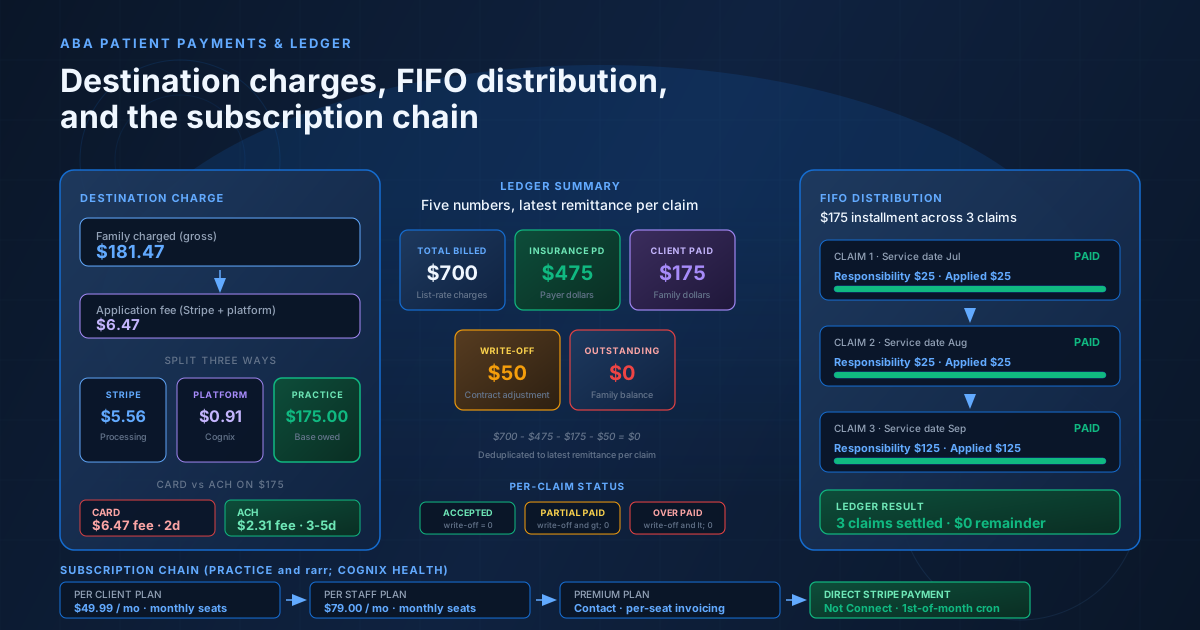
The destination charge has three destinations. Stripe retains the card-processing fee as a percentage of the gross charge plus a small fixed amount. Cognix Health retains a small percentage of the gross as the platform fee for running the software and the compliance surface. The practice — the connected account in Stripe's terminology — receives the base amount the family actually owed, less any fees the practice has chosen to absorb. The three-way split is what makes the practice's payout predictable: the gross charge minus the application fee equals the base amount, regardless of whether the family paid with a card that has an interchange markup or a bank transfer with no markup at all.
The destination charge also makes the family-facing payment experience uniform. The family sees a single charge on their statement, regardless of which payment method they used. The family sees the base amount they owe, a separate line for any processing fee, and a total. The family never sees the three-way split, the platform fee, or the connected-account payout — those are bookkeeping between the practice, Cognix Health, and Stripe. The family sees a clean "Amount Due — Processing Fee — Total" summary and a confirmation email with a transaction reference, exactly as the public help page promises.
The destination charge has two operational consequences worth naming. First, every patient payment requires the practice to have completed Stripe Connect onboarding — the practice has to have a connected account that can receive destination charges, with charges and payouts enabled. A family whose practice has not finished onboarding cannot pay through the portal at all; the practice sees a banner explaining that online payments are not yet available. Second, the destination charge has its own failure modes that direct charges do not — a disconnected Stripe account, a paused payout schedule, a verification hold on the connected account, or a flagged payment from the family's bank. Each of those is visible to the practice and surfaces in the payment history the biller reads on Monday morning.
The Two Payment Methods — Card and ACH
Every patient payment goes through one of two payment methods: a credit or debit card, or an ACH bank-account transfer. The two methods are functionally interchangeable from the practice's perspective — both produce a destination charge, both generate a payment ledger entry, both feed the same reconciliation flow. They differ in three operational ways: the fee math, the settlement time, and the failure mode. The fee math is the largest difference and the one the family sees first.
Card payments charge a percentage of the gross transaction plus a small fixed amount — roughly 2.9 percent plus thirty cents on a typical U.S. consumer card, with interchange-driven variation by card type and brand. The percentage is the same regardless of the size of the payment, so the fee grows with the dollar amount. A one-dollar card payment incurs the same percentage as a one-thousand-dollar card payment. There is no cap on the card fee — the practice pays the percentage on whatever the family charges.
ACH bank-account transfers charge a much smaller percentage — roughly 0.8 percent — capped at a maximum dollar amount (five dollars at the time of writing). The platform component is also percentage-based with a one-dollar cap. The combined ceiling is six dollars per ACH transaction. The result is that ACH is dramatically cheaper than Card on larger payments and roughly comparable on smaller payments. A family paying a five-hundred-dollar balance pays roughly eighteen dollars in fees on a card and roughly four dollars on ACH. A family paying a thirty-dollar balance pays roughly one dollar and seventeen cents on a card and roughly thirty-nine cents on ACH. The choice between the two is a cost-vs-speed tradeoff the family makes based on what they owe and how fast the payment needs to clear.
Settlement time is the second operational difference. Card payments settle in two business days; the family's card is charged immediately, and the practice's connected account receives the net amount two days later. ACH payments settle in three to five business days; the family's bank account is debited the same day, but the receiving bank holds the funds for the standard ACH clearing window before releasing them to the practice. A family choosing ACH for a one-hundred-dollar balance pays less in fees but the practice's bank balance does not reflect the payment for nearly a week. A family choosing Card pays more in fees but the practice sees the funds within forty-eight hours. The right choice depends on the practice's cash-flow position and how fast the family wants the balance cleared on the ledger.
The failure mode is the third difference. Card failures are immediate and visible — a declined card produces an error code in the Stripe response and the family sees the decline in the same session. ACH failures are delayed and batched — a returned ACH (insufficient funds, closed account, unauthorized debit) surfaces days after the original payment, sometimes weeks. The returned ACH has to be reversed on the ledger, the family's balance restored, and a new payment collected. The practice sees the reversal in the payment history the same way it sees an ERA from a payer, and the operations lead treats a returned ACH the same way they treat a denied claim — as an open receivable that needs follow-up.
The Two Fee Bearers — Client Pays or Practice Absorbs
Every patient payment has two fee bearers, and the choice between them is a single switch on the organization settings page. The default is that the family pays the fees — the practice receives the full base amount the family owes, and the family pays a slightly larger total to cover the processing. The alternative is that the practice absorbs the fees — the family pays exactly what they owe, and the practice's payout is reduced by the amount of the processing fee. The fee rates and caps are identical in both modes; only who bears the fee and the charge amount change.
The default — family pays — keeps the practice's revenue predictable. The practice's connected account receives the base amount the family owes, regardless of which payment method the family chose. The family sees a small processing fee added on top of their balance, and the practice's revenue is not affected by the family's choice between Card and ACH. A family choosing Card on a one-hundred-dollar balance pays one-hundred-and-three dollars and eighty-four cents, and the practice receives one-hundred dollars. A family choosing ACH on the same balance pays one-hundred-one dollars and thirty cents, and the practice receives one-hundred dollars. The practice's revenue is identical; the family's choice changes only what they pay and how fast it settles.
The alternative — practice absorbs — keeps the family's experience simple. The family sees exactly the amount they owe and pays exactly that amount, regardless of the payment method. The practice's payout is reduced by the processing fee, so the practice's revenue on a one-hundred-dollar balance becomes ninety-six dollars and seventeen cents on a card payment and ninety-eight dollars and seventy cents on an ACH payment. The choice between Card and ACH now matters to the practice, not just to the family — the practice pays less in fees when the family chooses ACH, which is the opposite of the default incentive. The fee-bearer switch is therefore a strategic decision the practice makes about whether to optimize for revenue predictability (default) or for family experience (absorb).
The switch is a one-click toggle on the organization settings page, and every payment that flows through the ledger honors the switch that was in effect at the time of the payment. A practice that flips the switch from family-pays to practice-absorbs mid-month changes the behavior of every payment that comes after — past payments are not retroactively re-priced, but every new payment uses the new setting. The audit trail on each payment records which setting was in effect, so a practice can always answer the question "why did this family's payment not include a processing fee?" by reading the ledger entry.
The switch can also be overridden per family. A practice that defaults to family-pays can choose to absorb the fees for one specific family — a family in financial hardship, a family with a long-term relationship, a family whose child has a complex case — and leave the default in place for everyone else. The override is per-family, takes effect immediately on save, and is recorded in the same audit trail as the org-level switch. The override survives later flips of the org-level switch, so a practice that sets an explicit override for a family is not surprised when the org-level switch moves and the family's experience stays the same.
The Two Payment Modes — Selected Claims or Custom Installment
Inside the family-facing ledger, every payment uses one of two payment modes. The two modes are not interchangeable — they produce different ledger entries, different reconciliation behaviors, and different downstream effects on the family's balance. The mode the family chooses is the mode the practice sees in the audit trail, and the biller needs to understand both.
The first mode is the selected-claims payment. The family sees a list of every claim on their ledger with an outstanding balance, ticks the claims they want to pay, and the system sums the outstanding balances across the ticked claims. The amount is fixed by what the family selected — the family cannot edit the amount, cannot pay more than the selected outstanding, and cannot pay less than the selected outstanding. Each ticked claim is settled up to its full outstanding balance; if the family ticks three claims with balances of forty dollars, sixty dollars, and twenty-five dollars, the family pays one-hundred-and-twenty-five dollars and all three claims land in the paid state. This is the mode the practice usually sees when a family is settling a specific bill or a specific visit.
The second mode is the installment payment. The family enters a custom dollar amount — anything from one dollar up to the total outstanding balance — and the system distributes that amount across the family's unpaid claims in a fixed order: oldest service date first, filling each claim's outstanding balance before moving to the next, until the money runs out. A family paying three-hundred dollars against a ledger with four claims and a one-hundred-dollar skip will see the oldest three claims settled to their outstanding balance and seventy dollars remaining unapplied — not because the system failed, but because three-hundred dollars is not enough to cover all four. This is the mode the practice usually sees when a family is paying what they can afford and trusting the system to allocate it fairly.
The two modes produce different ledger entries. A selected-claims payment produces one ledger entry per ticked claim, each entry recording the amount applied to that claim and the trace number shared across the batch. An installment payment produces one ledger entry per claim that received money, in the same order, with the same trace number. The trace number is what ties the entries together — every entry in a single payment carries the same trace number, so the biller can read the entries and reconstruct which payment covered which claims. The trace number for a Stripe payment is the Stripe payment reference; the trace number for a manual cash or check payment is a timestamped reference the biller enters at posting time.
The two modes also produce different audit trails. A selected-claims payment produces one ledger entry per ticked claim, each entry recording the amount applied to that claim and the trace number shared across the batch. An installment payment produces one ledger entry per claim that received money, in the same oldest-first order, with the same trace number. The trace number is what ties the entries together — every entry in a single payment carries the same trace number, so the biller can read the entries and reconstruct which payment covered which claims. The trace number for a Stripe payment is the Stripe payment reference; the trace number for a manual cash or check payment is a timestamped reference the biller enters at posting time.
How the Fee Responsibility Decision Is Made
The fee responsibility for a single payment — family pays or practice absorbs — is the result of a three-step lookup, performed at the moment the payment intent is created. The lookup is fast (a single read of the organization record), but the decision is recorded in the payment intent metadata so the audit trail can answer "why did this family's payment include a processing fee?" without reconstructing the settings as they were at the time of payment.
The first step is the per-family override. Each organization record carries a small map of explicit per-family overrides — a tiny JSON structure that records, for specific families, whether the practice has chosen to absorb the fees for that family or charge them the fees. The override is opt-in: a family without an override inherits the org-level default. A family with an override keeps the override even when the org-level default flips, so a practice that decides to absorb fees for one specific family is not surprised when the org-level switch later moves and the family's experience stays the same.
The second step is the org-level default. When a family has no per-family override, the payment honors the org-level switch — either family-pays (the default) or practice-absorbs. The switch is a single boolean on the organization record, visible on the organization settings page, and every payment that flows through the ledger honors the switch that was in effect at the time of the payment.
The third step is the fallback. If the org-level switch has never been set, the payment defaults to family-pays — the practice receives the full base amount and the family pays the processing fee on top. The fallback is not a hidden default; it is the same default the organization settings page shows when the practice has not yet touched the switch. A practice that wants the family-pays experience for every family can leave the switch alone and never set a per-family override.
The decision is recorded in the payment intent metadata as two pieces of information: the effective decision (family-pays or practice-absorbs) and the source of the decision (per-family override or org-level default). The source is the answer to "why did this family see a processing fee (or not)?" — it tells the practice whether the family's experience came from the family's own override or from the org-level switch. The source is visible to support and to the operations lead, so a family asking "why did I get charged a fee when my friend's family didn't?" can be answered with a single ledger entry.
FIFO Distribution Across Claims
When a family pays an installment amount, the system distributes the payment across the family's unpaid claims in a fixed order. The order is the service date — the oldest service date first, then the next oldest, then the next — until the payment is exhausted or every claim with outstanding responsibility is filled. The order is not the family's choice and not the biller's choice; the system enforces FIFO because every other order produces an outcome that is unfair to either the family or the practice.
FIFO matters because every other order creates a different kind of dispute. Paying newest-first means the family can pay down the latest claim while leaving older claims outstanding — the practice would have to chase the older claims later, often after the family's coverage has lapsed or the family has moved away. Paying largest-first means the family can settle the highest-dollar claim while leaving smaller claims open — the practice would have a portfolio of small receivables that are individually too small to chase but collectively too large to write off. Paying the family's selection means the family can apply payment to a claim that does not actually have a patient responsibility — the system has to refuse, or the payment silently sits unapplied. FIFO avoids all of these failure modes and produces an outcome every ABA billing operation can defend at audit: the family's dollars went to the oldest outstanding claim first, regardless of the family's preference or the biller's preference.
The distribution logic treats every claim as having an outstanding balance equal to its patient responsibility minus what has already been paid. A claim with a twenty-five-dollar responsibility and a ten-dollar prior payment has a fifteen-dollar outstanding; the distribution logic treats it as a fifteen-dollar obligation to fill. A claim with a zero-dollar responsibility has nothing to fill; the distribution logic skips it. A claim with a fully-paid responsibility has nothing to fill; the distribution logic skips it. The distribution runs until the payment amount is exhausted or every claim with an outstanding balance is filled, whichever comes first.
The distribution logic runs once per payment and produces a batch of ledger entries — one entry per claim that received money, each carrying the same trace number. The entries record the amount applied, the responsibility at the time of payment, and the balance left after the payment. The audit trail is complete: the biller can read the entries and reconstruct exactly which claim received which dollar of a single three-hundred-dollar installment payment, in order, with the dates the system saw and the balances the system calculated.
The Ledger View — Totals, Outstanding, and Status
The ledger view the biller reads on Monday morning is the summary of every claim the practice has billed, broken down by payment source. The view is built from a single summary object that aggregates five numbers across the date range the biller selected: total billed, total insurance paid, total client paid, total write-off, and outstanding balance. The five numbers tell the biller, at a glance, what the practice has done, what the payers have done, what the families have done, and what is still open.
Total billed is the sum of every claim's list-rate charges across the date range. It is the practice's gross charges — the dollars billed before any payment, adjustment, or write-off. The number is useful as a denominator for collection-rate calculations (total insurance paid plus total client paid, divided by total billed) but is rarely the headline number on the operations report.
Total insurance paid is the sum of every payer's actual payment across the date range. It is the dollars the practice has received from payers, net of any adjustments the payer took at adjudication. The number is the practice's revenue from payers — the dollars that arrived because the claim was clean, the authorization was in force, and the eligibility was confirmed.
Total client paid is the sum of every family's payments across the date range. It is the dollars the practice has received from families, net of processing fees (the ledger always records the base amount, not the gross charge, so the family's processing fees do not show up here). The number is the practice's revenue from families — the dollars that arrived because the family chose to settle their portion of the claim.
Total write-off is the sum of every contractual adjustment across the date range. It is the dollars the practice chose not to chase — the difference between the list rate and the sum of the payer's payment plus the family's responsibility, when the difference is positive. The number is the practice's adjustment revenue — the dollars the practice absorbed because the contract allowed less than the list rate, and the practice decided not to bill the family for the gap.
Outstanding balance is the sum of every family's unpaid responsibility across the date range. It is the dollars the practice has billed but not yet collected from families — the family's responsibility minus what the family has paid, summed across every claim with a positive outstanding balance. The number is the practice's open receivables — the dollars the biller needs to follow up on, and the dollars the operations lead watches as a leading indicator of cash-flow health.
The five numbers are calculated against the most recent remittance per claim. A claim with several remittances — a primary payer that initially denied, then paid after a corrected submission, then paid a secondary portion — counts only the latest remittance's payment, responsibility, and adjustment. The earlier remittances are not double-counted; they remain in the remittance history the biller can read, but the summary numbers reflect only the latest adjudication. The dedup is by the date the remittance was received, and the system picks the latest remittance per claim before summing — which is what produces a consistent five-number summary even when a claim has been touched by several payers.
The per-claim status flows from the same write-off math. A claim where the payer paid exactly the contracted amount (so the write-off is zero) lands in the accepted state. A claim where the payer paid less than the contracted amount (so the write-off is positive) lands in the partial-paid state. A claim where the payer paid more than the contracted amount (so the write-off is negative) lands in the over-paid state. A claim where the payer denied or reversed the claim lands in the rejected state. The state is set at the moment the remittance posts and does not change when the family later pays their portion — a claim that reads partial-paid stays partial-paid even after the family has settled the family's share, because the partial is about the payer's adjudication, not the family's balance. The biller reads the status for the payer's behavior and the outstanding balance for the family's behavior.
The Subscription Flow — How the Practice Pays Cognix Health
The patient ledger is one of two ledgers the practice manages in Cognix Health. The other is the subscription ledger — what the practice pays Cognix Health for the software itself. The two ledgers look superficially similar but are architecturally separate, route through different payment mechanics, and have different failure modes.
The subscription flow bills the practice on the first of each month for the previous month's seats. The seats are the active client count or the active staff count, depending on the plan the practice has chosen. The practice's invoice is generated by a scheduled job that runs on the first of the month, totals the active seats across the practice, multiplies by the per-seat rate, and produces a single invoice line. The invoice is then either sent to the practice's owner for manual payment or charged automatically against the practice's saved payment method.
The practice has two payment methods for the subscription: Card and ACH bank transfer. Both use the same fee structure as patient payments — a percentage-based Stripe fee plus a percentage-based platform fee, with ACH carrying lower percentages but a cap on the total fee. The fee is added on top of the invoice subtotal by default (the practice pays the fees) but can be waived by a Cognix Health super admin on a specific invoice, in which case the practice is charged exactly the invoice subtotal and Cognix Health absorbs the fee.
The auto-billing path requires the practice to have saved a payment method on file. The setup is a one-time flow on the subscription settings page: the practice adds a card or bank account through Stripe's secure payment element, the method is stored against the practice's Stripe customer record, and the practice opts into auto-billing. Once opted in, the first-of-the-month job charges the saved method automatically and posts the payment to the invoice. The manual path is the fallback: if the practice has not opted into auto-billing, the invoice is sent by email and the practice pays through an embedded Stripe checkout session from the subscription settings page.
The two ledgers meet at the fee math. The same Stripe fee structure, the same platform fee, the same ACH caps — but the money flows in opposite directions. The patient ledger is dollars flowing from families into the practice's connected account. The subscription ledger is dollars flowing from the practice into Cognix Health's platform account. A practice that optimizes for one side of the fee math should think about the other side too — a practice that absorbs patient-payment fees is paying fees both on what they collect from families and on what they pay to Cognix Health, and the combined fee burden shows up in the practice's margin on the operations report.
The Audit Trail — Trace Numbers, Idempotency, and Reconciliation
Every payment in Cognix Health leaves an audit trail that lets the biller, the operations lead, and the auditor reconstruct exactly what happened. The trail has three pieces: a trace number that ties the payment to its source, a set of ledger entries that records how the payment was distributed, and a flag that prevents a duplicate payment from being posted twice.
The trace number is the link between the payment and the row that produced it. A Stripe payment carries the Stripe payment reference as its trace number, so the biller can read the trace number on a ledger entry and find the corresponding charge in Stripe. A check payment carries the check number. A cash payment carries a timestamped reference the biller entered at posting time. A returned ACH carries the original trace number plus a reversal flag, so the operations lead can see the original payment and the reversal as a pair. The trace number is the field that ties the ledger entry to the bank statement, the Stripe dashboard, and the family's confirmation email.
The ledger entries are the per-claim records of where the payment went. A single three-hundred-dollar installment payment produces a batch of ledger entries — one per claim that received money, each carrying the same trace number, each recording the amount applied, the responsibility at the time of payment, and the balance left after the payment. The biller can read the entries in trace-number order and reconstruct exactly which claim received which dollar of a single payment. The entries are immutable: a correction does not edit the original entry, it produces a new entry that records the correction. The audit trail is the history of corrections, not the history of edits.
The idempotency flag is the protection against double-posting. Every Stripe payment carries a unique reference, and the system checks whether a payment with that reference has already been posted before creating a new set of ledger entries. A duplicate webhook — the same payment reference arriving twice because Stripe retried the event — finds an existing ledger entry and exits without creating a second batch. The protection is invisible to the family and the practice; it shows up only when something goes wrong on Stripe's side and a webhook is delivered more than once. The biller never sees a payment posted twice, even when the upstream payment processor is having a bad day.
The reconciliation flow ties the ledger back to the bank statement. Every payment has a date, a trace number, an amount, and a source. The biller reads the payment history, matches each row against the corresponding bank deposit, and flags any row that has not yet appeared on the bank statement. A card payment typically settles in two business days; an ACH payment in three to five. A payment that has not cleared within those windows is a follow-up — the operations lead contacts the family, confirms the payment was authorized, and waits for the funds to arrive. The reconciliation is manual, but the reconciliation list the biller reads is built from the same immutable ledger entries the audit trail reads.
Worked Example: One Client, Three Claims, Two Payment Methods
A patient has three claims on their ledger from the last quarter. The first claim has a list rate of two hundred dollars, an insurance payment of one hundred and fifty dollars, and a patient responsibility of twenty-five dollars — leaving an outstanding balance of twenty-five dollars and a write-off of twenty-five dollars (the payer paid its contracted share and the family owes its share). The second claim has the same shape — list rate of two hundred, insurance paid one hundred and fifty, responsibility twenty-five, outstanding twenty-five, write-off twenty-five. The third claim has a list rate of three hundred dollars, an insurance payment of one hundred and seventy-five dollars, and a patient responsibility of one hundred and twenty-five dollars — leaving an outstanding balance of one hundred and twenty-five dollars and a write-off of zero (the payer paid its contracted share and the family owes its share).
The family owes one hundred and seventy-five dollars across the three claims. They choose to pay by Card, with the practice's default setting of family-pays in effect. The processing fee on a one-hundred-and-seventy-five-dollar Card charge is roughly six dollars and forty-seven cents — a percentage-based Stripe fee plus a percentage-based platform fee, with no cap. The family is charged one hundred and eighty-one dollars and forty-seven cents, and the practice receives one hundred and seventy-five dollars. The payment is an installment payment (the family chose to pay what they could afford rather than select specific claims), so the FIFO distribution kicks in.
The FIFO distribution sorts the three claims by service date. The first claim (service date in July) is the oldest; the second claim (service date in August) is the next; the third claim (service date in September) is the newest. The distribution walks the sorted list, applying the family's dollars to each claim's outstanding balance until the payment is exhausted or every claim is filled.
The first claim has an outstanding balance of twenty-five dollars. The distribution applies twenty-five dollars, the claim lands in the paid state, and the family's payment has one hundred and fifty dollars remaining.
The second claim has an outstanding balance of twenty-five dollars. The distribution applies twenty-five dollars, the claim lands in the paid state, and the family's payment has one hundred and twenty-five dollars remaining.
The third claim has an outstanding balance of one hundred and twenty-five dollars. The distribution applies one hundred and twenty-five dollars, the claim lands in the paid state, and the family's payment has zero remaining. The payment is fully applied across all three claims, and the family has cleared the entire ledger.
The payment produces three ledger entries, each carrying the same trace number (the Stripe payment reference). The first entry shows twenty-five dollars applied to the first claim, with a balance of zero afterwards and a status of paid. The second entry shows twenty-five dollars applied to the second claim, with a balance of zero afterwards and a status of paid. The third entry shows one hundred and twenty-five dollars applied to the third claim, with a balance of zero afterwards and a status of paid. The operations lead sees three settled claims and no unapplied remainder — the payment is complete.
The audit trail carries the full picture: the payment intent metadata records the family-pays decision and the org-level default source; the trace number ties the three ledger entries to the single Stripe charge; the ledger entries record the amount applied to each claim and the balance left behind (zero in every case). The biller can reconstruct every decision the system made from the audit trail alone, and the family can see the same payments reflected on their portal within minutes of the Stripe webhook firing.
A different family on the same three claims, paying only one hundred dollars through the installment mode, would see a different distribution. The first claim receives its full twenty-five dollars, the second claim receives its full twenty-five dollars, and the third claim receives fifty dollars toward its one-hundred-and-twenty-five-dollar outstanding — leaving the third claim in the partial-paid state with seventy-five dollars still owed. The audit trail records the partial fill against the third claim and the zero remainder against the first two, and the operations lead sees the open seventy-five-dollar balance on the third claim as the next receivable to follow up on. The FIFO order is the same; the only difference is how much money the family brought to the distribution.
Best Practices
-
Post patient payments against the ledger the same day they arrive. A card payment settles in two business days; an ACH payment in three to five. Posting the payment to the ledger as soon as the webhook fires — rather than waiting for the bank deposit — keeps the family's portal accurate and prevents the operations lead from chasing a payment that has already been made. The payment is real the moment the family authorizes it; the bank settlement is a separate, downstream event.
-
Run the ledger summary at the start of every week, not just at month-end. A weekly cadence catches the patterns that a monthly cadence misses: a family whose payment was returned by ACH and silently reverted, a payer that posted a remittance that changed every claim's write-off, an installment payment that left an unapplied remainder against a denied claim. The summary is a five-number report; reading it weekly takes less than a minute and surfaces problems while they are still small.
-
Reconcile every payment against the bank statement within seven days. The bank deposit and the ledger entry should match on amount, trace number, and date. A mismatch is either a Stripe payout delay, a returned ACH, or a posting error — three very different problems that require three very different responses. A weekly reconciliation habit catches all three before they become patterns.
-
Set the per-family override deliberately, not by default. A practice that wants every family to have the same fee experience should leave the org-level switch in place and not set any per-family overrides. A practice that wants to absorb fees for one specific family should set the per-family override for that family and leave the org-level switch alone. The override is opt-in; the org-level switch is the default; the two should not be mixed on the same family.
-
Use installment payments for partial payments and selected-claims payments for full settlements. A family paying what they can afford should use installment — the FIFO distribution handles the allocation fairly and the audit trail records every dollar that landed. A family paying a specific bill should use selected-claims — the family names the claims, the system fills them, and the audit trail shows zero unapplied remainder. Mixing the two modes produces audit trails that are hard to read and reconciliation that is harder to defend.
-
Treat the subscription ledger as a separate budget line, not a footnote. The fees on patient payments and the fees on subscription payments are the same fee structure but they hit different sides of the practice's margin. A practice that absorbs patient-payment fees is paying fees on both the inbound and the outbound sides, and the combined fee burden shows up in the practice's net margin. The subscription ledger is the place to model the combined fee burden, not the patient ledger alone.
-
Keep the organization's Stripe Connect account in good standing. A connected account that has charges disabled or payouts paused is the single most common reason a family cannot pay through the portal. The operations lead should check the Stripe dashboard monthly for verification holds, payout delays, or flagged payments, and resolve them before the practice's receivables start piling up. A healthy Stripe Connect account is the precondition for a healthy patient ledger.
Common Mistakes
How Cognix Health Supports the Patient Ledger
Cognix Health treats the patient ledger as a first-class workflow, not an afterthought to the claim lifecycle. The Stripe Connect destination charges, the Card and ACH fee math, the two fee bearers, the two payment modes, the FIFO distribution, the per-claim write-off, the ledger summary aggregation, the audit trail, the idempotency flag, and the subscription flow all share the same view of the practice's money — from the moment a Stripe payment intent is created through the moment the family has settled every claim on their ledger.
The workflow includes:
- A Stripe Connect destination charge at every patient payment — the family pays into a connected account that splits automatically between Stripe's processing fee, Cognix Health's platform fee, and the practice's base amount, with a single ledger entry per claim that received money and one immutable trace number tying the batch together
- A choice between Card and ACH at every payment — both methods route through the same destination charge, the same fee structure, and the same reconciliation flow, but Card settles in two business days with no cap on the fee while ACH settles in three to five business days with a fee cap that makes it dramatically cheaper on larger balances
- A single switch that decides who pays the processing fee — the org-level setting absorbs the fee on the practice's side or passes it to the family, with a per-family override for the cases the practice wants to handle individually, both recorded in the payment intent metadata so the audit trail can answer why a specific family saw the experience they saw
- A selected-claims mode and an installment mode at every payment — the family settles specific claims up to their outstanding balance or pays a custom amount that the system distributes oldest service date first, with the FIFO order, the per-claim status update, and the trace number tying the batch together all handled automatically
- A write-off calculated from list rate, payer payment, and family responsibility — the difference sets the claim's status into accepted, partial-paid, or over-paid, and the per-claim status is read by the biller for the payer's behavior and the outstanding balance is read by the operations lead for the family's behavior
- A ledger summary that aggregates five numbers across the date range — total billed, total insurance paid, total client paid, total write-off, and outstanding balance, deduplicated to the latest remittance per claim so a claim with several payer responses never inflates the summary by double-counting
- A subscription flow that is architecturally separate from the patient ledger — the practice's monthly invoice is generated by a scheduled job, charged to the practice's saved payment method or paid manually through embedded Stripe checkout, with the same fee structure on both sides and a per-invoice waiver the super admin can apply
- An audit trail with trace numbers, idempotency, and reconciliation — every payment carries a trace number that ties to Stripe or the bank deposit, every webhook is checked for a duplicate before posting, and every ledger entry is immutable so corrections produce new entries rather than editing old ones
The goal is to keep both ledgers honest. The family sees a portal that reflects what they owe and what they have paid, updated within minutes of every payment. The biller sees a summary that reflects what the practice has collected and what is still open, aggregated against the date range the operations lead selected. The auditor sees an audit trail that reconstructs every decision the system made from the trace numbers and the metadata alone. The payer sees a clean claim that reconciles back to the same ledger entry the family sees. The subscription ledger sees the practice's own fees on a separate flow that does not contaminate the patient numbers.
Want to see how the patient ledger fits your practice workflow? Contact Cognix Health to schedule a demo.
Frequently Asked Questions
How does a patient payment get from the family's card to the practice's bank account?
A patient payment flows through a Stripe Connect destination charge. The family enters their card or bank account details in the patient portal, the system creates a payment intent for the gross amount (which is the base amount plus any processing fees the family is paying), Stripe charges the family's card or debits their bank account, and the dollars are split automatically between three destinations: Stripe retains the processing fee as a percentage plus a small fixed amount, Cognix Health retains a small percentage as the platform fee, and the practice's connected account receives the base amount the family actually owed. The family sees a single charge on their statement; the practice sees a single deposit in their bank account; Cognix Health sees a single platform fee. The whole flow completes in two business days for cards and three to five business days for ACH.
Why does ACH have a fee cap and Card does not?
ACH is a bank-to-bank transfer with a small fixed cost to the processor, regardless of the dollar amount. Stripe charges roughly 0.8 percent capped at five dollars, and the platform component is a small percentage capped at one dollar, with a combined ceiling of six dollars. Card processing is a percentage of the gross charge with no cap, because the card networks charge a percentage that grows with the dollar amount. The result is that ACH is dramatically cheaper than Card on larger payments — a five-hundred-dollar balance pays roughly four dollars in ACH fees and roughly eighteen dollars in Card fees — and roughly comparable on smaller payments.
What happens if a family cannot pay the full balance at once?
The family can use the installment payment mode. The family enters any dollar amount up to the total outstanding balance, the system distributes the payment across the family's unpaid claims in oldest service date first order, and each claim is filled to its outstanding balance before the system moves to the next claim. A family paying three hundred dollars against a one-thousand-dollar ledger sees the oldest claims settled and a remainder that the family can pay later. The audit trail records every dollar that landed and every claim that received money, so the biller can reconstruct the partial payment later.
What is the difference between a partial-paid claim and a family with a partial-paid balance?
A partial-paid claim is a claim where the payer paid less than the contracted amount — the write-off is positive, and the family's responsibility is the difference between the list rate and the payer's payment. A family with a partial-paid balance is a family that has paid some but not all of their responsibility across one or more claims. The two states are independent: a family can have a fully-paid balance on a partial-paid claim (their share is settled, the payer's share is short), and a family can have an outstanding balance on an accepted claim (the payer paid in full but the family has not yet paid their share). Read the outstanding-balance column for family balances, not the claim-status column.
How does the practice decide who pays the processing fee — the family or the practice?
The decision is a single switch on the organization settings page, with an optional per-family override for the families the practice wants to handle individually. The default is family-pays — the family sees a small processing fee added to their balance and the practice receives the full base amount. The alternative is practice-absorbs — the family pays exactly what they owe and the practice's payout is reduced by the processing fee. The switch can be flipped at any time, every new payment honors the switch that was in effect at the time of the payment, and the audit trail records both the decision and the source of the decision (per-family override or org-level default).
How does the installment distribution decide which claims to pay?
The installment distribution walks the family's unpaid claims in oldest service date first order and fills each claim to its outstanding balance before moving to the next. A claim with a zero responsibility (the payer covered the full amount) or a fully-paid responsibility is naturally skipped because there is nothing to apply the family's dollars to. A claim with a positive responsibility is never skipped — the family's installment dollars apply to it normally, oldest first. The distribution produces a clear audit trail that records every dollar that landed and every claim that received money.
How does the patient ledger interact with the claim lifecycle?
The patient ledger reads the latest remittance per claim to compute its summary numbers, and the claim lifecycle writes a new remittance every time the payer responds. When a remittance arrives, the claim's write-off is recalculated, the claim's status is set (accepted, partial-paid, over-paid, rejected), the family's responsibility is updated, and the ledger summary reflects the new numbers. The two flows share the same claim row — the biller reads the claim's status for the payer's behavior and the ledger's outstanding balance for the family's behavior.
What happens when an ACH payment is returned?
The original ledger entry is reversed, the family's balance is restored, and the trace number carries a reversal flag so the operations lead can see the original payment and the reversal as a pair. A returned ACH typically surfaces days or weeks after the original payment, when the family's bank notifies Stripe that the funds were not available or the debit was unauthorized. The operations lead contacts the family to understand the situation and collects a new payment through a different method. A practice with a high rate of returned ACH should consider pushing families toward Card, where the failure is immediate and the family can retry with a different card in the same session.
How does the subscription flow stay separate from the patient ledger?
The subscription flow bills the practice to Cognix Health through a direct Stripe payment, not a destination charge — the money flows from the practice to Cognix Health's platform account rather than from the family to the practice's connected account. The subscription invoice is generated by a scheduled job on the first of each month, the practice's seats are totaled and multiplied by the per-seat rate, and the invoice is either auto-charged against the practice's saved payment method or sent by email for manual payment. The two ledgers share the same fee structure but are otherwise independent — a practice that wants to model the combined fee burden reads both ledgers together.
What is the relationship between the ledger summary and the operations report?
The ledger summary is the financial core of the operations report. Total billed is the practice's gross charges for the period; total insurance paid is the practice's revenue from payers; total client paid is the practice's revenue from families; total write-off is the practice's adjustment revenue; outstanding balance is the practice's open receivables. The five numbers together describe the practice's revenue cycle for the period — what was billed, what was paid, what was written off, and what is still outstanding. The operations report adds the staffing, scheduling, and authorization numbers to the same period; the ledger summary is the financial half of the picture.
This post was prepared by the Cognix Health team. The Stripe Connect destination charge configuration, the Card and ACH fee math, the two fee bearers, the two payment modes, the FIFO distribution, the write-off calculation, the ledger summary aggregation, the subscription flow, and the audit trail described here reflect the production behavior of the Cognix Health patient ledger as of October 2026. For questions about how this workflow fits your practice, reach the team at admin@cognixhealth.com.